
 Phone: 1(877) 215.8104
 Login
LoginWordPress is a free personal publishing platform. It is an easy to use, fast and flexible blog script. It comes with a great set of features, designed to make your experience as a publisher as pleasant as possible. With WordPress you can easily:
- Publish and edit posts;
- Sort articles in categories;
- Search within your content;
- Manage users’ access;
- Change your website themes and more.
With the FastWebHost WordPress hosting services you can use all WP features.
How to install WordPress?

Please, visit the pages listed below to find detailed instructions on how to install WordPress on your website with the help of the Softaculous auto-installation tool or via the built-in web installer. Please, note, that you can request a free WordPress installation with the FastWebHost hosting pack.
- How to install WordPress via Softaculous
- Manual installation of WordPress
How to create a blog site with WordPress?
Once you have installed WordPress you can start building your blog. First, navigate to the WP login page entering the exact URL:
www.yourdomainname.com/wp-login.php
There you should enter the login credentials, which you have chosen during the installation process. Then you will enter the Administration area of the WordPress script:
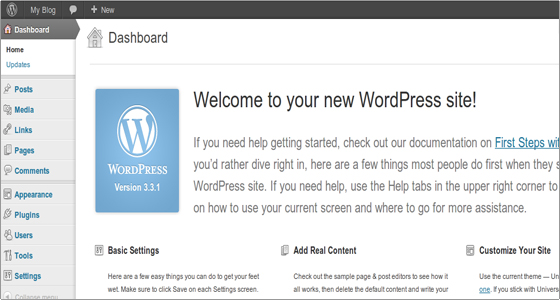
How to start blogging?
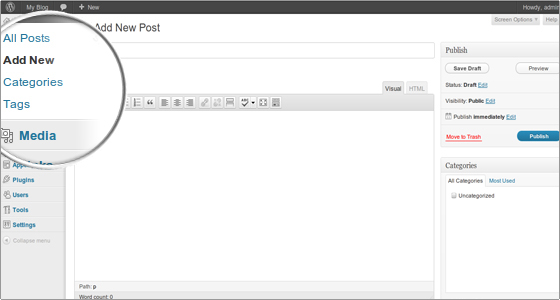
Click the Publish button once ready and your post will be immediately visible at the front page of your blog!
WordPress Categories, Comments, and Themes
- How to create a category?
- How to post comments in WordPress?
- How to change a theme?
- Options in WordPress
Useful links:
- Best hosting solution for WordPress
- WordPress Developer’s page
- WordPress tutorial
- Adding blogs from external sources – Blogger